
Estimated reading time: 4 minutes
Table of contents
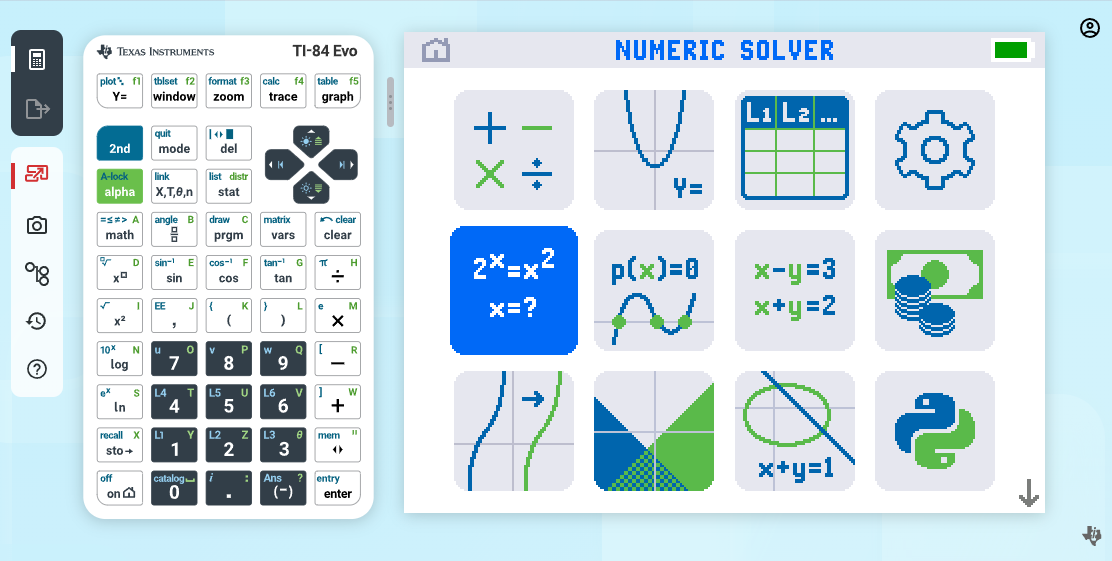
With the launch of the Ti-84 Evo, Texas Instruments didn’t just release a new handheld — they also introduced a powerful companion: the Ti-84 Evo Online Graphing Calculator. Whether you’re a student doing homework at home, a teacher projecting equations to a class, or an administrator looking to outfit a whole school, the online calculator is worth understanding. Here’s a complete breakdown of what it is, what it can do, and how to get it.
What Is the Ti-84 Evo Online Calculator?
The Ti-84 Evo Online Graphing Calculator is a browser-based web app that emulates the Ti-84 Evo handheld directly inside Google Chrome. That means students and educators can access the same apps, features, and functionality as the physical calculator — from any Chromebook, Windows PC, or Mac — without needing to have the device in hand.
You can access it at 84evo.ti.com (or the easy-to-remember shortcut at ti.software).
Note: The online calculator requires an internet connection to log in, but once you’re signed in, it supports offline use as well.
What Can You Do With It?

Since the online calculator is nearly identical to the physical Ti-84 Evo, almost everything you can do on the handheld can be done online. That includes:
- Graphing equations — Cartesian, parametric, polar, sequences, inequalities, and conics
- Analyzing functions — Trace points of interest like local extrema, zeros, y-intercepts, and intersections
- Statistics — Run hypothesis tests, compute confidence intervals, and work with probability distributions
- Matrix operations — Inverse, determinant, RREF, transpose, and more
- Python programming — The full Python app is included in the online version
- Tables and data — Numeric evaluations across all graphing modes
One standout feature for educators is the Screen Capture tool (the small camera icon in the top-left corner of the app). It lets you quickly capture and save screenshots of your work. It’s great for sharing screenshots with students.
Who Is It For?
Students
If you own a physical Ti-84 Evo, you already have access to the online calculator. A free four-year license is included with every retail Ti-84 Evo. It’s perfect for doing homework at a laptop, practicing at home when your handheld is in your backpack, or working on a school Chromebook.
Educators
The online calculator shines in the classroom. Teachers can project it on a screen to walk students through how to use their calculators step-by-step. It creates a shared visual experience that makes it much easier to demonstrate new functions in real time.
Schools
When a school purchases a Ti-84 Evo Teacher Pack (10 handhelds), they receive 50 free four-year licenses to the online calculator — enough to give every student in a class access, whether or not they own the physical device.
System Requirements
The Ti-84 Evo Online Calculator runs in the Chrome browser (version 137 or newer) on the following platforms:
- Chromebook
- Windows
- macOS
Note: Phones and tablets are not currently supported.
License Options
There are two main license types:
Single-User License Intended for individual students or end users. You can get it two ways:
- Purchase a Ti-84 Evo handheld — a four-year license is included at no extra cost.
- Purchase a standalone one-year license from an authorized dealer like Underwood Distributing Co. or directly from Texas Instruments.
Multi-User License Built for teachers and administrators who need to distribute access to multiple students. Multi-user licenses are available in 1-year, 2-year, and 3-year increments, starting at a minimum of 5 users and scaling as large as needed.
How to Get Started

Once you have a license, setup is straightforward:
- Create a TI account by visiting this link. (Or you can skip this step and sign in with an existing Google or Microsoft Account using the link in the next step)
- Use the Activation Link provided to go to the License Activation Center.
- Enter your activation key to complete the process.
- Open Chrome and navigate to 84evo.ti.com (or ti.software).
- Sign in and start calculating.
Is the Ti-84 Evo Online Calc It Worth It?
If you already own a Ti-84 Evo handheld, the online calculator is a no-brainer because it’s free. For schools, the 50 licenses bundled with the Teacher Pack add serious value for students who may not have their calculator on hand at home. And for educators who want a clean, projectable teaching tool, it’s one of the best options available.
The Ti-84 Evo Online Calculator isn’t just a backup for when you’ve forgotten your calculator — it’s a fully capable learning tool in its own right.
Have questions about the Ti-84 Evo or the online calculator? Drop them in the comments below, or check out our other guides at ti84evo.com.