
Estimated reading time: 13 minutes
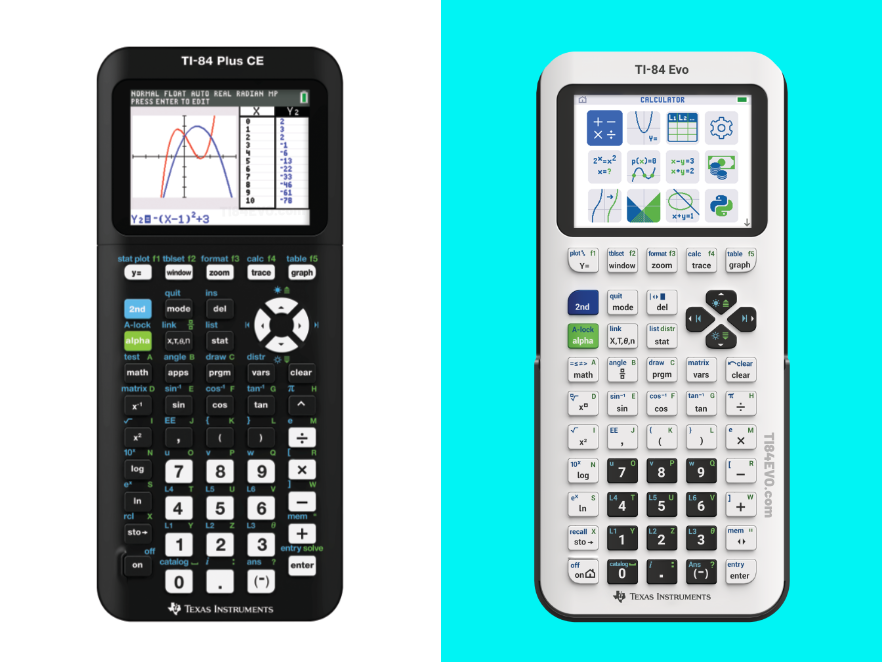
If you’ve spent any time in a math or science classroom over the last decade, you’ve probably seen a TI-84 Plus CE sitting on someone’s desk. It’s been the gold standard of graphing calculators since 2015. But as of April 28, 2026, Texas Instruments officially released its long-awaited successor: the TI-84 Evo.
So what exactly changed? Is the TI-84 Evo worth the upgrade? Or is the trusty TI-84 Plus CE still good enough for your needs? This comprehensive comparison guide covers everything you need to know — from raw performance specs to interface design, exam eligibility, pricing, and more.
Table of contents
- 1. Quick Overview: TI-84 Plus CE vs. TI-84 Evo
- 2. Processor & Performance
- 3. Display & Screen
- 4. Graphing Capabilities
- 5. User Interface & Navigation
- 6. Keyboard & Physical Design
- 7. Memory & Storage
- 8. Charging & Connectivity
- 9. Programming Capabilities
- 10. Exam Eligibility
- 11. Color Options
- 12. Price Comparison
- 13. Who Should Buy Which Calculator?
- 14. Final Verdict
1. Quick Overview: TI-84 Plus CE vs. TI-84 Evo
| Feature | TI-84 Plus CE | TI-84 Evo |
|---|---|---|
| Release Year | 2015 | 2026 |
| Processor | Zilog eZ80 @ 48 MHz | ARM Cortex @ 156 MHz |
| Processing Speed | Baseline | 3x faster |
| Graphing Area | Standard window (264×165 pixels) | 50% larger (319×209 pixels) |
| Home Screen | Text-based menu | Icon-based home screen |
| Charging Port | Mini-USB | USB-C |
| Python Support | Ti-84 Plus CE Python edition only | Built-in (all models) |
| Online Calculator | Free 4-year Ti-84 Plus CE Online Calculator License | Free 4-year Ti-84 Evo Online Calculator License |
| Price | ~$110–$140 | ~$130–$160 |
| Exam Eligible | Yes | Yes |
2. Processor & Performance
This is where the TI-84 Evo makes its biggest leap forward.
The TI-84 Plus CE runs on a Zilog eZ80 processor clocked at 48 MHz — an architecture with roots stretching back over 30 years. While TI improved speed somewhat through hardware revisions over time (particularly in revisions M and later from 2019 onward), the platform was fundamentally aging.
The TI-84 Evo breaks with that heritage entirely. It runs on an ARM Cortex CPU clocked at 156 MHz, which delivers roughly 3 times the processing speed of the TI-84 Plus CE. This isn’t just a raw numbers upgrade — it translates directly into real-world performance improvements: graphs render noticeably faster, complex equations resolve without lag, and switching between screens and menus is nearly instantaneous.
Notably, this architectural shift likely means the TI-84 Evo’s operating system has been rebuilt from the ground up on ARM, rather than emulating the eZ80-based codebase that the TI-84 Plus CE family has used for decades. That’s a significant engineering change, and it sets the stage for faster development of new features going forward.
Bottom line: The TI-84 Evo is dramatically faster. For most students doing algebra or precalculus, the CE’s speed is adequate — but for AP Calculus, statistics-heavy coursework, or anyone who wants a snappier experience, the Evo is a clear winner.
3. Display & Screen
Both calculators feature a full-color, backlit LCD display — a significant advantage over the older monochrome TI-84 Plus. However, the Evo refines the visual experience in several meaningful ways.
- Color backlit LCD
- Standard graphing window surrounded by a border/bezel
- Smaller default font size
- Color backlit LCD (same resolution base)
- Graphing border removed — the graph now spans the full screen, giving 50% more visible graphing area
- Larger default font sizes throughout for improved readability
- More whitespace around the entry line for a cleaner, less cluttered look
- Yellow status bar with contextual hints that appear as you work
The removal of the graphing border on the Evo is a genuinely impactful change. Students can see more of a function’s behavior at once, which makes identifying trends, intercepts, and extrema significantly easier — especially at a glance during a timed exam.
Bottom line: Both are color screens, but the Evo’s larger graphing area and improved typography make it noticeably easier to read and interpret mathematical output.
4. Graphing Capabilities
Both calculators are powerful graphing tools, and TI has kept the core mathematical functionality consistent between generations. Both can graph:
- 10 Cartesian functions (rectangular coordinates)
- 6 parametric expressions
- 6 polar expressions
- 3 recursively defined sequences
- Sequence graphing with time series, cobweb/stair-step, and phase plots
- Up to 16 inequalities
- Real and complex numbers calculated to 14-digit accuracy
However, the TI-84 Evo adds several quality-of-life improvements to the graphing experience:
Points of Interest Trace Mode: Enabled by default, this feature automatically highlights points of interest — zeros, local extrema, y-intercepts, and intersections — as you trace along a function. The TI-84 Plus CE required you to manually navigate to these points using dedicated menu functions.
Larger graphing area: As mentioned above, the full-screen graph gives the Evo 50% more visual real estate. The physical display is the exact same size as the Ti-84 Plus CE; however, on the software side of things, TI made a change so the graph fills up the entire screen (instead of only part of it).
Improved Conics App: The Evo’s Conics app now supports lines in standard form and allows you to explore relationships across multiple conics simultaneously. Apps like Transformation Graphing, Inequalities, and Conics now auto-launch without requiring manual confirmation.
Graph-Table Simultaneous View: When viewing a function graph and table side by side on the Evo, tracing highlights where the traced point falls between table values in blue — a visual aid that the CE doesn’t provide.
Full-Screen Equation Editing: On the Evo, pressing the toggle key expands the equation editor to full-screen mode, making it easier to review and edit long or complex expressions.
Distribution & Statistics Menus: The Distribution menu has been reorganized for easier navigation of probability calculations, and the Statistics menu now has separate lists for Tests and Confidence Intervals, rather than combining them.
Bottom line: Both calculators are capable graphing tools approved for major exams. The Evo adds usability features that make the graphing experience faster and more intuitive, particularly for students new to graphing calculators.
5. User Interface & Navigation
This is arguably the most visible difference between the two calculators.
TI-84 Plus CE: The CE uses a traditional text-based menu system. When you turn on the calculator, you see a blank calculation screen. To access apps, you press a dedicated “APPS” button, which brings up a text list of available applications. While functional and familiar to veteran users, this interface can be intimidating for students encountering the TI-84 for the first time.
TI-84 Evo: The Evo introduces a completely redesigned icon-based home screen — a first for the TI-84 family. When you turn on the Evo, you’re greeted by a grid of app icons, each with a relevant visual (for example, the Finance app displays a dollar sign and coins icon). This is conceptually similar to the NumWorks graphing calculator and Casio fx-CG series, making the overall experience feel more modern and intuitive.
Menus throughout the Evo use smaller font sizes with more explanatory text, reducing the guesswork involved in finding the right function. Categories and subcategories are more clearly organized, and common tools are more prominently featured.
The Evo also includes a yellow status bar that displays contextual hints and guidance as you work through problems — a helpful feature for students learning to navigate the calculator independently.
Bottom line: The CE‘s interface is familiar and functional for experienced users. The Evo’s icon-based home screen and reorganized menus are more approachable for beginners, while still being efficient for advanced users.
6. Keyboard & Physical Design
Both calculators share the same fundamental form factor — a handheld device with a QWERTY-style math keyboard, arrow keys, and a color screen. At a glance, the two look very similar.
However, the TI-84 Evo’s keypad has been redesigned to reduce visual clutter. Key labels are cleaner and more legible, and the layout makes commands and shortcuts easier to identify at a glance. TI has described the goal as making the calculator easier to learn and use with fewer steps.
Both calculators include a protective slide case/cover. On the Evo, the slide case matches the color of the calculator body.
Physical size is similar between both models, making the Evo a familiar form factor for anyone who has used the CE.
The School Property Edition (EZ-Spot) versions of both calculators exist for institutional purchase. The CE’s EZ-Spot edition uses a distinctive yellow tint to deter theft. The Evo’s Teacher Pack also includes design differences (different key colors and charging indicators) to distinguish classroom sets from personal units.
7. Memory & Storage
- 154 KB of user-accessible RAM
- 3.0 MB of Archive memory
- 256 KB RAM
- 3.5 MB storage
The Evo represents a modest but meaningful step up in memory. The increase in RAM helps support the faster processor and more complex interface, while the additional storage allows more apps, programs, and data to be saved to the device.
For the vast majority of students, the CE’s memory is more than sufficient for everyday math and science coursework. The Evo’s additional headroom becomes more valuable if you use Python programming, store multiple programs, or use the calculator for advanced coursework over multiple years.
8. Charging & Connectivity
This is one of the most immediately practical upgrades in the TI-84 Evo.
TI-84 Plus CE: The CE charges via Mini-USB — a connector that is increasingly rare and inconvenient in 2026. Most modern devices use USB-C, meaning CE users often need to hunt for a dedicated cable.
TI-84 Evo: The Evo charges via USB-C — the universal standard used by laptops, smartphones, tablets, and most other modern electronics. A USB-C cable is included with each calculator. This means students can use the same cable for their calculator, phone, and laptop — a small but genuinely appreciated quality-of-life improvement.
Both calculators are rechargeable (the older TI-84 Plus used AAA batteries, so this is a shared advantage of the CE/Evo generation).
Online Transfer: The Evo also includes a web-based file transfer application for moving files between the calculator and a computer — an improvement over the older TI Connect software. This makes it easier to back up programs, update the OS, and transfer data without needing to install dedicated software.
Online Calculator: Both the TI-84 Plus CE and TI-84 Evo include a free 4-year license to their respective online calculator emulator with every retail purchase:
- TI-84 Plus CE: Comes with a free 4-year license for the TI-84 Plus CE Online Calculator.
- TI-84 Evo: Comes with a free 4-year license for the TI-84 Evo Online Calculator.
Teachers often use the online calculator to help teach students and solve problems on the board with the students. Students often use the online calculators to do homework and to have a Ti-84 ‘on the go.’
For schools purchasing a Teacher Pack (10 handhelds), the TI-84 Evo includes 50 free four-year online licenses, while the TI-84 Plus CE Teacher Packs typically include fewer or require separate purchase depending on the bundle.
9. Programming Capabilities
- TI-BASIC programming is supported on all CE models
- Python programming requires the TI-84 Plus CE Python edition (a separate model)
- On the Python edition, CircuitPython runs on a separate ARM Cortex M0 co-processor communicating via UART — a setup that is notably slow compared to competitors like NumWorks
- C and assembly (ASM) programming was removed in OS 5.5.x following security concerns in 2020
- TI-BASIC and Python programming are built into all Evo units (no separate Python edition needed)
- CircuitPython support is integrated natively, built on the ARM Cortex CPU — a faster and more elegant solution than the CE Python’s co-processor approach
- Like the CE, C and ASM programming are not supported
For students and educators interested in introducing programming concepts alongside mathematics, the Evo is the better option — Python is available out of the box without needing to purchase a specific edition. The faster ARM processor also means Python code runs noticeably quicker than on the CE Python edition.
10. Exam Eligibility
Both calculators are approved for major standardized exams, which is a core requirement for any classroom graphing calculator.
Approved exams for both TI-84 Plus CE and TI-84 Evo:
- SAT®
- ACT®
- PSAT/NMSQT®
- AP® course exams
- IB® Diploma Programme exams
This is critically important: the TI-84 Evo does not sacrifice exam approval for its new features. Students can confidently use the Evo on any test that permitted the TI-84 Plus CE.
Note: Exam policies can change. Always verify calculator policies with the College Board, ACT, or your specific testing organization before your exam date.
11. Color Options
TI-84 Plus CE has historically been available in a wide variety of colors, including: Black, Galaxy Gray, Radical Red, Bionic Blue, Iris (Purple), Count on Coral, Mint, Bright White, Rose Gold, Trinomial Teal, Fractal Frost, and more.
TI-84 Evo launched in eight colors: White, Metallic Raspberry, Mint, Lavender, Teal, Metallic Silver, Pink, and Yellow (EZ-Spot School Edition).
The Evo’s color palette skews toward softer, more pastel tones compared to the CE’s broader range. All Evo colors come with a matching slide case. TI has indicated that each color has a corresponding background image, adding a subtle personalization touch to the calculator’s interface.
12. Price Comparison
TI-84 Plus CE: Approximately $110–$140 (retail, varies by retailer and edition)
TI-84 Evo: Approximately $130–$160 (retail)
The Evo carries a roughly $20–$30 premium over the CE. When you factor in the bundled four-year online calculator license (which has standalone value), the effective price difference narrows. For schools purchasing in bulk, TI offers institutional pricing on Teacher Packs.
Whether the upgrade is “worth it” financially depends on your situation — see the next section for a breakdown by user type.
13. Who Should Buy Which Calculator?
Buy the TI-84 Plus CE if…
- You already own one. If you have a working TI-84 Plus CE, there is no urgent reason to upgrade. It still handles all standard math coursework through calculus.
- Budget is a primary concern. The CE is $20–$30 cheaper and widely available refurbished.
- You’re buying for a middle schooler who just needs a basic graphing calculator for algebra and geometry. The CE is proven, durable, and sufficient.
- You prefer the classic TI-84 interface. Power users who know exactly where every menu item lives may not appreciate the Evo’s reorganized menus.
Buy the TI-84 Evo if…
- You’re purchasing a new graphing calculator for the first time. The Evo’s icon-based interface and larger graphing area make it a better learning tool for students new to graphing calculators.
- Speed matters. If you’re taking AP Calculus, Statistics, or any course with heavy graphing demands, the 3x faster processor and 50% larger graphing area are real advantages during timed exams.
- You want Python programming. The Evo includes Python on every unit without needing a separate Python edition.
- You want USB-C charging. If you’ve already standardized on USB-C for all your devices, the Evo fits right into that ecosystem.
- You’re a teacher. The bundled online calculator licenses and classroom projection features make the Evo’s Teacher Pack compelling for educators.
- You’re buying for the long term. The Evo is TI’s current flagship and will receive OS updates and support for years to come.
14. Final Verdict
The TI-84 Evo is unambiguously the better calculator. It is faster, more readable, more modern, and more beginner-friendly than the TI-84 Plus CE, while preserving full compatibility with the same exam approvals and mathematical capabilities students depend on.
That said, the TI-84 Plus CE remains a fully capable, exam-approved graphing calculator. If you already own one, it is not obsolete. But for anyone purchasing a new graphing calculator in 2026, the Evo is the right choice — it is the TI-84 that students and educators have been waiting for.
The jump from Mini-USB to USB-C alone will save students from countless “where is my charging cable?” moments. The 50% larger graphing area and 3x faster processor are icing on the cake.
No. Like the TI-84 Plus CE, the Evo is intentionally designed as a distraction-free, offline device. Connectivity is limited to USB-C for charging and data transfer.
The TI-84 Evo is available in White, Raspberry, Mint, Lavender, Teal, Silver, Pink, and Yellow (EZ-Spot School Edition)
TI has not announced a formal discontinuation of the CE as of this writing. However, the Evo is TI’s current flagship, and the CE will likely be phased out over time.
The TI-84 Evo Online Calculator is a web-based emulator of the physical calculator. Retail purchases include a free four-year license. Teachers can use it to project the calculator display to the entire class.
TI has indicated TI-BASIC programs should be compatible. C and ASM programs are not supported on either calculator (removed from the CE in 2020). Check TI’s official documentation for the latest compatibility details.
Last updated: June 2026. Prices and product availability subject to change. Always verify exam calculator policies with the relevant testing organization before your exam.