
Estimated reading time: 9 minutes
Table of contents
Whether you’re a student heading into a new school year or a parent setting your kid up for success, the right accessories can take a TI-84 Evo from a great calculator to a fully equipped learning device. Since the TI-84 Evo and TI-84 Plus CE share the same dimensions, any accessory built for the CE fits the Evo perfectly. Here are our top picks.
Cases
co2CREA Carrying Case
This is the go-to carrying case if you want serious protection without the bulk. The co2CREA case is built with a hard EVA shell that’s shockproof, dustproof, and water-resistant — so whether it’s riding around in a backpack or sitting on a cafeteria table, your calculator is safe. Inside, a soft anti-static lining cushions the calculator from bumps and scratches. A built-in hand strap makes it easy to grab and go, and there’s enough interior room for your calculator plus accessories like cables or some note cards.
Why we like it: The hard shell construction genuinely protects against drops, something soft pouches just can’t match. It’s compatible with a wide range of TI calculators too, so if you upgrade or have multiple calculators in the house, one case covers all of them.
The case also comes in many colors: Black, Fractal Frost, Gray, Iris Purple, Mint, Plum, Red, Rose Gold, White, Blue, Metallic Coral, Pink, and Teal.
WYNGS Protective Case for TI-84 Plus CE

The WYNGS case is a slim, lightweight option for students who want protection without the extra weight in their bag. Made from durable hard EVA with a zip closure that runs across three sides, and it keeps the calculator snug when closed. The interior is lined with soft fabric to prevent scratches on the screen and body. It comes in a range of colors — black, and pink — so it’s easy to personalize or tell calculators apart in a classroom.
Why we like it: It’s one of the most affordable, no-fuss protective cases available. Slim enough to slide into any backpack pocket, and the soft lining does a great job protecting that backlit screen from daily wear.
The Ti-Innovator Product Line
Ti-Innovator Hub

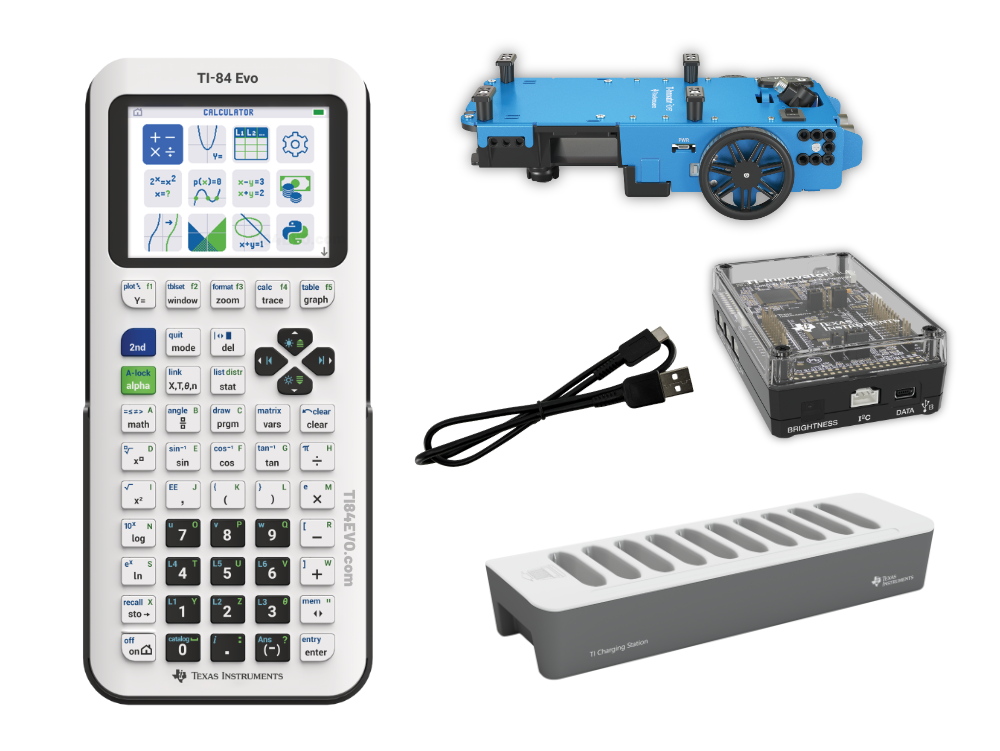
The TI-Innovator Hub is the foundation of TI’s hands-on STEM ecosystem and the required starting point for everything in this section. It plugs directly into the TI-84 Evo’s I/O port and gives students the ability to write code on their calculator that controls real-world hardware. Out of the box, the Hub includes a built-in RGB LED, a red LED, a light sensor, and a speaker — all programmable from the calculator. It also has multiple input and output ports for connecting additional components and accessories.
Why we like it: The Hub is what turns a calculator into a coding and engineering platform. Once you have it, a whole ecosystem of add-ons opens up. The three products below all require the Hub to work.
Ti-Innovator Rover

The TI-Innovator Rover is a two-wheeled programmable robotic vehicle that connects to the TI-Innovator Hub. Students write code on their calculator to drive it, navigate obstacles, follow color-coded paths, or draw shapes on paper using the built-in marker holder. The Rover includes two motors with encoders for precise movement tracking, a color sensor, and an ultrasonic ranger for measuring distance to obstacles.
Why we like it: This is the accessory that makes kids actually want to use their calculator. Abstract programming concepts become tangible — you write the code, you watch it move. For students interested in robotics or engineering, it’s an incredible gateway.
TI-Innovator I/O Module Pack

The I/O Module Pack expands what you can build with the Hub. It includes four components that connect directly to the Hub’s input and output ports: a 360-degree continuous rotation servo motor, a vibration motor, a light sensor, and a white LED.
Why we like it: It’s an affordable way to go beyond the Hub’s built-in sensors and start building real working devices. Students can program a servo to move, trigger vibration feedback, or respond to light levels — a great stepping stone into electronics and engineering design.
TI-Innovator Breadboard Pack

For students ready to go deeper into electronics, the Breadboard Pack is a comprehensive component kit that connects to the TI-Innovator Hub’s breadboard connector. It includes a 2″ x 3″ breadboard, 50 jumper cables (male-to-male and male-to-female), assorted LEDs (green, red, and RGB), a full range of resistors (100 Ohm through 10M Ohm), capacitors, a seven-segment display, an infrared transmitter and receiver, a thermistor, temperature sensor, potentiometer, small DC motor, light sensor, MOSFET transistors, and more.
Why we like it: This is a full electronics starter kit in one box, purpose-built to work with TI’s ecosystem. Instead of hunting for individual components, students have everything they need to explore circuits, sensors, and basic electronics concepts right out of the box. It’s exceptional value for the component count.
Charging Stations
TI Charging Station

This is the charging solution built specifically for the TI-84 Plus CE and TI-84 Evo. The charging station holds and simultaneously charges up to 10 calculators from a single AC adapter, keeping your desk (or classroom) free of a tangled mess of cables. At 3.25″ H x 4.75″ W x 15″ D, it has a compact footprint and keeps calculators neatly organized and ready to go. It is not compatible with other calculator models.
Why we like it: For teachers managing a class set of calculators, this is a must-have. For families with multiple students using TI calculators, it’s a game-changer. One cord, everything charged, nothing lost.
Unitek 10-Port USB Charging Station
If you need to charge a classroom set of calculators but don’t want to spend on the OEM solution, the Unitek 10-Port USB Charging Station is a flexible, budget-friendly alternative. It charges up to 10 devices simultaneously across its USB-A ports, with SmartIC technology that automatically detects each connected device and delivers the optimal charge to each one. The adjustable dividers let you organize calculators (or any other devices) side by side without them scratching each other. Total output is 96W, it’s UL listed and RoHS certified, and it includes multi-protection against over-charging, over-voltage, overheating, and short circuits. Note that since the TI-84 Evo charges via USB-C, you’ll need to use the cables that came with your calculators to connect the calculators to the Unitek 10-Port USB Charging Station.
Why we like it: It’s a universal charging hub that isn’t locked to one device ecosystem. Teachers can use it for calculators today and tablets tomorrow. The adjustable dividers are a nice touch for keeping things organized without a designated slot system.
Replacement Charging / Data Transfer Cables
Anker USB-C Cable 2-Pack (3 ft)
The TI-84 Evo charges over USB-C, and having a reliable cable on hand is essential. The Anker 3ft USB-C cable is one of the most trusted options available — premium nylon braiding keeps it tangle-free and durable over thousands of bends, and it supports fast charging. The 2-pack means you can keep one at home and one in your backpack, or stash a spare without spending much.
Why we like it: Anker has a stellar reputation for cable quality and longevity. The 3ft length is ideal for calculator charging — long enough to use comfortably while plugged in, short enough to not be a tangled mess. Getting a 2-pack at the price point makes it a no-brainer.
Replacement Parts and Pieces
CalcPop Ti-84 Evo Replacement Calculator Bumpers

The rubber bumpers on the back of the TI-84 Evo and the front of the slide cover take a beating over time — they absorb the drops, thuds, and daily desk landings so the calculator doesn’t have to. When they fall out, these CalcPop replacement bumpers are a perfect replacement. They’re black (just like the originals), made to fit the Ti-84 Evo calculator (including the slide cover), and come in packs of 10, 50, or 100. Installation is easy: clean the bumper cavity, press the bumper in firmly for 5 seconds, and let it cure for 24–48 hours.
Why we like it: This is one of those accessories you don’t think about until you need it — and when you do, you’ll be glad it exists. At just a few dollars for a 10-pack, it’s the cheapest way to extend the life of a calculator and keep it looking sharp.
Ti-84 Evo Replacement OEM Rechargeable Battery

After a few years of regular use, the TI-84 Evo’s built-in rechargeable battery will eventually stop holding a charge the way it used to. This is the official Texas Instruments replacement battery, made specifically for the TI-84 Evo, and it brings the calculator right back to full battery life. It’s straightforward to swap out, and it’s covered under Texas Instruments’ One-Year Limited Warranty. We recommend replacing the battery of the TI-84 Evo with an OEM Texas Instruments’ battery as they’re manufactured specifically for the calculator.
Why we like it: Instead of replacing a perfectly good calculator just because the battery degraded, an inexpensive OEM replacement battery fixes the problem entirely. It’s a smart, low-cost repair that keeps a calculator in service for years longer.
Final Thoughts
Whether you’re just looking to protect your investment with a solid case or you want to turn your calculator into a full STEM learning platform with the Innovator ecosystem, there’s something on this list for every type of student. The TI-84 Evo is an extremely capable calculator — the right accessories just help you get the most out of it.