
Estimated reading time: 18 minutes
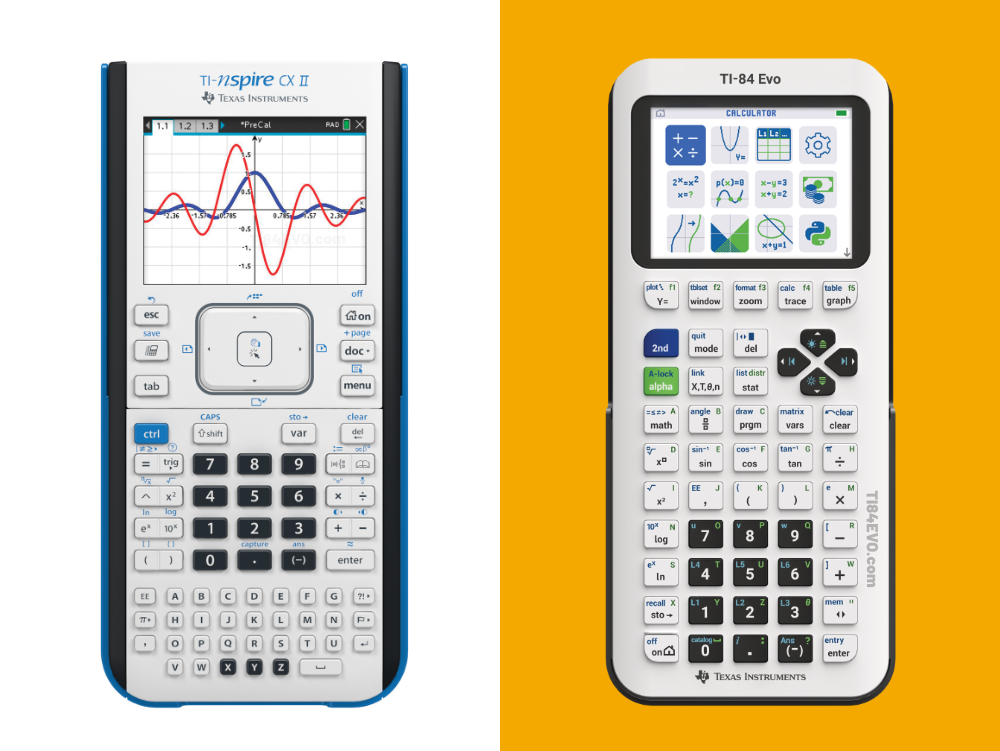
Choosing between the TI-Nspire CX II and the TI-84 Evo is one of the most common questions students, parents, and teachers face when shopping for a graphing calculator. Both are made by Texas Instruments, and both are powerful tools built for the modern classroom. However, they are designed with very different students in mind.
In this guide, we break down every key difference between the TI-Nspire CX II and the TI-84 Evo — including screen quality, course compatibility, available colors, online calculator licenses, compatible accessories, and more. By the end, you’ll know exactly which calculator is the right fit for your needs.
Table of contents
- Two Great Calculators, Two Different Philosophies
- Screen Comparison
- Course Compatibility
- Exam Approval
- Available Colors
- Hardware Differences
- Interface and Navigation
- Programming
- Software Licenses
- Teacher Packs
- Compatible Accessories
- The CAS Version: What Is It and Do You Need It?
- Price and Value Comparison
- Who Should Buy the TI-84 Evo ?
- Who Should Buy the TI-Nspire CX II ?
- Final Thoughts
- Frequently Asked Questions
Two Great Calculators, Two Different Philosophies
Before diving into the details, it helps to understand what each calculator is trying to accomplish.
The TI-Nspire CX II is a full-featured math and science platform. It’s built around a document-based, computer-like experience — complete with a touchpad, multiple simultaneous views, 3D graphing, interactive geometry, and real-time data collection via external sensors. In short, it’s designed for students who need a powerful, versatile tool that grows with them into college-level STEM coursework.
The TI-84 Evo, launched in April 2026, is the most advanced evolution of the beloved TI-84 family. It takes everything familiar about the TI-84 experience and dramatically improves it — with a faster processor, a larger graphing area, a modern USB-C port, and a redesigned interface built for speed and clarity. As a result, it’s ideal for students who want a capable, approachable calculator without a steep learning curve.
Both calculators are excellent. The key is knowing which one matches your academic path.
Screen Comparison
One of the first things you’ll notice when comparing these two calculators side by side is the difference in display quality and layout.

TI-Nspire CX II Screen
The TI-Nspire CX II features a 320 x 240 pixel backlit color display measuring 3.2 inches diagonally. It renders at 125 DPI with full 16-bit color, resulting in a sharp, vibrant image. Importantly, the Nspire’s screen is designed to show multiple representations of a problem at the same time — for example, an algebraic expression, a graph, and a table of values all displayed simultaneously in a split-screen view. That multi-pane capability is central to how the TI-Nspire CX II works.
TI-84 Evo Screen
The TI-84 Evo features a 320 x 240 pixel backlit color display measuring 2.8 inches diagonally. It renders at 140 DPI with full 16-bit color. Additionally, the Evo supports full-screen graph viewing, giving students maximum visibility when analyzing functions.
Which Screen Wins?

Both screens are bright, colorful, and easy to read. They both have the same quantity of pixels, and the same color ranges; however, since the screen of the Ti-84 Evo is 0.4 inches smaller diagonally, the pixel density is 15 DPI higher than then Ti-Nspire CX II. So in the end, its a tie!
Course Compatibility
Knowing which courses each calculator supports is arguably the most important factor in making your decision. If you don’t want to read this entire section, the key take away is that the Ti-84 Evo is a great beginner graphing calculator; however, while the TI-Nspire CX II can be used for all the courses a Ti-84 Evo can be used for, if your child isn’t going to be taking high level math classes, the Ti-84 Evo is much more user friendly. As always, reach out to your student’s math teacher and ask them what calculators they use in their classroom.
TI-Nspire CX II: Recommended Courses
The TI-Nspire CX II is recommended for a wide range of courses — from middle school through college and beyond:
Mathematics: Pre-Algebra, Algebra 1 & 2, Geometry, Trigonometry, Precalculus, AP Precalculus, Calculus, AP Calculus, Statistics, AP Statistics, Differential Equations, Linear Algebra, College Math
Science: Life Science, Earth Science, Physical Science, Biology, AP Biology, Chemistry, AP Chemistry, Physics, AP Physics, AP Environmental Science
STEM & Technology: Computer Science, High School Robotics, High School Engineering, High School Cybersecurity, Mechanical Engineering
Business: Business & Personal Finance, College-Level Economics
Notably, the TI-Nspire CX II’s built-in interactive geometry engine, 3D graphing support, and real-time sensor compatibility make it particularly valuable for lab-based science courses and upper-division STEM programs. Furthermore, the optional CAS (Computer Algebra System) version — the TI-Nspire CX II CAS — adds symbolic algebra capabilities, enabling students to solve equations, factor expressions, and compute exact symbolic derivatives and integrals.
TI-84 Evo: Recommended Courses
The TI-84 Evo is built to grow with students from middle school through college. It covers all standard high school and introductory college math requirements:
Mathematics: Pre-Algebra, Algebra 1 & 2, Geometry, Trigonometry, Precalculus, AP Precalculus, Calculus, AP Calculus, Statistics, AP Statistics
Business & Finance: Business Math, Personal Finance, Time-Value-of-Money calculations
The TI-84 Evo handles everything expected in a standard high school curriculum exceptionally well. It also includes a Polynomial Root Finder (for polynomials up to degree 10), a Systems of Equations solver (up to 10 equations and 10 unknowns), and 11 regression models. However, it does not support 3D graphing, interactive geometry, or CAS functionality.
Course Compatibility Summary
If your coursework centers on high school and introductory college math, the TI-84 Evo covers everything you need. On the other hand, if you’re headed into engineering, upper-division sciences, or courses requiring symbolic computation, the TI-Nspire CX II is the stronger long-term choice.
Exam Approval
Fortunately, students don’t need to choose between these two calculators based on exam eligibility. Both the TI-Nspire CX II and the TI-84 Evo are approved for:
- SAT
- PSAT/NMSQT
- ACT
- AP Course Exams
- IB Diploma Programme
Neither calculator has an advantage on exam day. Both will get you through any major standardized test.
Note: The TI-Nspire CX II CAS version can have its CAS functionality disabled for exams that restrict symbolic computation tools.
Available Colors
Color options are an area where these two calculators differ significantly — and it’s worth knowing before you buy.
TI-Nspire CX II Colors

The TI-Nspire CX II is available in one standard color: the classic blue and black design. There are no alternative consumer color options. For students who want to express their personality through their calculator, this is a notable limitation.
TI-84 Evo Colors

In contrast, the TI-84 Evo launched with seven vibrant color options, making it feel more like a personal accessory than a classroom tool:
- White — Clean, crisp, and timeless
- Pink — Bold and expressive
- Mint — Cool, fresh, and modern
- Raspberry (Metallic) — Vivid and eye-catching
- Silver (Metallic) — Sleek and futuristic
- Teal — Sharp with personality
- Lavender — Soft and calming
Additionally, the TI-84 Evo Teacher Pack comes in EZSpot Yellow — a bright, distinct color specifically designed to help teachers identify school-owned calculators at a glance and prevent them from walking out the door.
Hardware Differences
Beyond the screen, there are several key hardware differences that could influence your decision.
Processor and Memory
The TI-84 Evo runs on a 156 MHz processor — three times faster than its predecessor — and comes with 3.5 MB of user-available memory. This results in noticeably faster graphing and calculations, especially when working with complex functions or large datasets.
The TI-Nspire CX II, meanwhile, offers significantly more storage: 90+ MB of storage memory and 64 MB of operating memory. That extra capacity matters for students who save documents, images, notes, and multi-page files directly on their device — something the document-based Nspire workflow relies on heavily.
Connectivity
One of the most practical upgrades on the TI-84 Evo is its USB-C port. USB-C is the modern standard used by most laptops, phones, and tablets, which means charging and data transfer cables are easy to find and replace. The calculator ships with a standard A to USB-C cable included.
By comparison, the TI-Nspire CX II uses a Mini-B USB port — an older, smaller connector that isn’t as universally available. While it works well, finding a replacement cable can be more inconvenient. Don’t worry though, when you purchase a Ti-Nspire CX II, it includes a 24″ charging cable in the box!
Touchpad vs. Button Navigation
The TI-Nspire CX II features a touchpad for computer-like cursor navigation. This allows students to directly grab elements on screen — for example, dragging a graph to watch the equation update in real time. It’s a genuinely powerful feature for understanding math conceptually, though it does require some adjustment for students used to traditional calculators.
The TI-84 Evo, by contrast, uses a redesigned (when compared to the previous Ti-84 Plus CE) button-based keypad with cleaner labeling and improved menu organization. Navigation is fast and intuitive. A new icon-based home screen puts the most commonly used tools front and center, so students spend less time digging through menus.
Interface and Navigation
The user experience on these two calculators is fundamentally different, and it’s worth understanding before committing to one.

The TI-Nspire CX II uses a document-based system similar to a computer. Students create, save, and organize their work in .tns files, which can contain multiple pages across several apps — Calculator, Graphs, Geometry, Lists & Spreadsheets, Notes, Data & Statistics, and more. One of its most impressive features is the ability to display algebraic, graphical, numeric, and written representations of a problem simultaneously. Manipulating one view instantly updates all the others.
The TI-84 Evo takes a more streamlined approach. Its new icon-based home screen gives instant access to the most-used math tools. Smarter, reorganized menus make it easier than ever to find what you need. New features like Points of Interest Trace automatically highlight zeros, extrema, y-intercepts, and intersections while tracing. The Faster Points of Intersection feature skips setup steps when working with two functions, saving time during exams and classwork. A built-in yellow context bar also provides helpful hints as you work — without giving away answers.
The TI-84 Evo is, therefore, easier to learn and faster to navigate for day-to-day use. The TI-Nspire CX II has a higher ceiling but requires more time to master.
Programming
Both calculators support Python and TI-Basic programming, making them both valid options for students taking computer science electives or learning to code.
The TI-Nspire CX II features a dedicated programming environment with programmable libraries, giving students global access to user-defined functions and programs. This more sophisticated setup is well-suited for students going deeper into computer science.
The TI-84 Evo also supports Python and TI-Basic, covering what most high school computer science courses require. Both are solid choices for learning the fundamentals of programming.
Software Licenses
Online calculator access and computer based emulators of calculators are increasingly important — and the two calculators handle it very differently.
TI-Nspire CX II Student Software License
Every retail purchase of a TI-Nspire CX II handheld includes a free four-year license to the TI-Nspire CX II Student Software. This downloadable computer application emulates a Ti-Nspire CX II graphing calculator.
TI-84 Evo Online Calculator License
Every retail purchase of a TI-84 Evo handheld includes a free four-year online calculator license — an $80 value — at no additional cost. Students can use the TI-84 Evo Online Calculator from any browser-enabled computer, Chromebook, or tablet. Teachers can also project the online calculator for whole-class instruction and demonstrations.
Teacher Packs
For schools equipping classrooms, teacher packs offer the best value. However, the two packs are meaningfully different in what they include.
TI-Nspire CX II Teacher Pack

The TI-Nspire CX II Teacher Pack includes everything needed to set up a calculator-ready classroom:
- 10 TI-Nspire CX II EZSpot Yellow handheld calculators (school-property edition)
- 10 USB-A to Mini USB computer-to-calculator data transfer and charging cables (24 inches)
- 5 Mini USB to Mini USB calculator-to-calculator data transfer cables
- TI-Nspire CX Docking Station (stores and charges all 10)
- Getting Started Information
- Free license to TI-Nspire CX Teacher Premium Software (a $189 value)
- 500 TI Rewards Points
- 1 TI-Nspire CX II Graphing Calculator classroom poster
The TI-Nspire CX Teacher Premium Software is a powerful classroom management tool that lets teachers project the calculator display, send and receive files from student calculators, run polls, and monitor student progress in real time.
There are two versions available:
- TI-Nspire CX II Teacher Pack (standard): ~$1,600.00
- TI-Nspire CX II CAS Teacher Pack: ~$1,620.00
Note that the TI-Nspire CX II teacher pack does not include additional software licenses for students beyond the included Ti-Nspire CX Teacher Premium Software.
TI-84 Evo Teacher Pack
The TI-84 Evo Teacher Pack is stacked with extras — particularly the bundled online licenses, which set it apart from competing options:
- 10 TI-84 Evo EZSpot Yellow handheld calculators (school-property edition)
- 10 USB-A to USB-C computer-to-calculator data transfer and charging cables (24 inches)
- 5 USB-C to USB-C calculator-to-calculator data transfer cables
- 1 TI Charging Station (stores and charges all 10)
- Getting Started Information
- 50 free four-year TI-84 Evo Online Calculator licenses (enough for 5 class periods of 10 students)
- 500 TI Rewards Points
- 1 TI-84 Evo Graphing Calculator classroom poster
The 50 bundled four-year online licenses are an outstanding value. They mean that every student in up to five class periods can access the TI-84 Evo Online Calculator at home, in the library, or on a school device — at no extra cost to the school.
Compatible Accessories
Accessories can significantly expand what a calculator can do — and this is one of the areas where the two calculators differ most. To make things easy, we made a table of which accessories the calculators are compatible with!
| Accessory | TI-Nspire CX II | TI-84 Evo |
|---|---|---|
| TI-Innovator Hub | ✓ | ✓ |
| TI-Innovator Rover | ✓ | ✓ |
| TI-Innovator I/O Module Pack | ✓ | ✓ |
| TI-Innovator Breadboard Pack | ✓ | ✓ |
| TI-SensorLink Adapter | ✓ | ✓ |
| TI-RGB Array | ✓ | ✓ |
| External Battery for Hub | ✓ | ✓ |
| CBR 2 Motion Sensor | ✓ | ✓ |
| TI-Nspire CX Navigator System | ✓ | — |
| TI Charging Station | — | ✓ (included in Teacher Pack) |
| TI-Nspire CX Docking Station | ✓ (included in Teacher Pack) | — |
| BBC micro:bit | ✓ | — |
| CoDrone EDU | ✓ | — |
The CAS Version: What Is It and Do You Need It?
It’s worth addressing the TI-Nspire CX II CAS separately, because it’s a common source of confusion.
CAS stands for Computer Algebra System. The CAS version of the TI-Nspire CX II can perform symbolic mathematics — meaning it solves equations algebraically, factors expressions, computes exact symbolic derivatives and integrals, and simplifies expressions in terms of variables. For example, rather than computing a numerical approximation of an integral, the CAS gives you an exact algebraic answer.
The TI-84 Evo, on the other hand, computes numerically only — it gives you decimal approximations rather than exact symbolic answers.
For most high school courses, numerical computation is all you need. However, if you’re heading into college courses like Abstract Algebra, Differential Equations, or upper-level Calculus where symbolic computation is expected, the CAS version is worth the modest price premium. Note also that the CAS can be disabled on the TI-Nspire CX II CAS for any exam that prohibits it.
Price and Value Comparison
| | TI-84 Evo | TI-Nspire CX II |
|---|---|---|
| Individual handheld price | ~$120 to $160 | ~$130 to $180 |
| Software Included | Free 4-year Ti-84 Evo online calculator license included | Free 4-year Ti-Nspire CX Student Software license included |
| Teacher pack (10 units) | Includes 50 free 4-year online licenses + charging station | Includes 1-year CX Teacher Premium Software license |
| CAS version available? | No | Yes |
| Colors available | 7 (+ EZSpot Yellow for schools) | 1 (+ EZSpot Yellow for schools) |
| USB connector | USB-C | Mini-B USB |
| 3D graphing | No | Yes |
| CoDrone EDU compatible | No | Yes |
| Screen Type | Color; Backlit Display | Color; Backlit Display |
| Screen Size | 2.8″ diagonally (320 x 240) | 3.2″ diagonally (320 x 240) |
| Pixel Density | 140 DPI (dots per inch) | 125 DPI (dots per inch) |
| Storage memory | 3.5 MB | 90+ MB |
| Slide Cover Included? | Yes | Yes |
Who Should Buy the TI-84 Evo?
The TI-84 Evo is the right choice if you:
- Are taking standard high school math courses — Algebra, Geometry, Precalculus, AP Calculus, AP Statistics
- Want a fast, approachable calculator with an intuitive interface
- Want a free four-year online calculator license bundled in
- Care about having a color option that reflects your personality
- Prefer the traditional TI-84 button-based navigation experience
- Are in a classroom where TI-84 curriculum materials are already in use
- Are looking for strong value at a competitive price point
Who Should Buy the TI-Nspire CX II?
The TI-Nspire CX II is the right choice if you:
- Need 3D graphing, interactive geometry, or real-time sensor data collection for science labs
- Are taking or planning upper-division STEM, engineering, or advanced science courses
- Need or want CAS (symbolic algebra) functionality — in which case, opt for the CX II CAS version
- Prefer a document-based workflow that saves and organizes work like a computer
- Want to visualize math simultaneously in algebraic, graphical, numeric, and written forms
- Are in a school or program embedded in the TI-Nspire ecosystem
- Need CoDrone EDU drone compatibility for robotics or computer science courses
Final Thoughts
Both the TI-Nspire CX II and the TI-84 Evo are outstanding graphing calculators that will serve students well throughout their academic careers. Choosing between them comes down to your coursework, learning style, and how far you plan to take your math and science education.
For most high school students taking standard math courses, the TI-84 Evo is the clear winner — it’s fast, intuitive, colorful, and ships with a free four-year online license. For students heading into upper-level STEM, science labs, or courses requiring symbolic computation, the TI-Nspire CX II offers capabilities the TI-84 Evo simply can’t match.
When in doubt, check with your teacher before purchasing. Many schools standardize on one platform, and using a different calculator than your classmates can create challenges when following along with classroom instruction.
Frequently Asked Questions
Yes. Both the TI-Nspire CX II and the TI-84 Evo are approved for the SAT, PSAT/NMSQT, ACT, AP course exams, and the IB Diploma Programme.
The TI-84 Evo is Texas Instruments’ newest and most advanced graphing calculator in the TI-84 family, launched in April 2026. It features a faster processor, larger graphing area, USB-C port, and a bundled online calculator license that the earlier models did not include.
The standard TI-Nspire CX II computes numerically. The CAS version adds a Computer Algebra System that performs symbolic math — exact algebraic solutions, factoring, symbolic derivatives and integrals, and more. The CAS can be disabled for exams that don’t allow it.
The TI-Nspire CX II has a steeper learning curve than the TI-84 Evo because of its document-based interface and touchpad navigation. However, Texas Instruments offers extensive tutorials, guidebooks, and video resources to help students get up to speed quickly.
No. The TI-Nspire CX II uses a document-based file system (.tns files) that lets students create, organize, and save multi-page documents containing graphs, calculations, notes, spreadsheet data, and images — similar to how a laptop saves files. The TI-84 Evo stores programs, variables, and lists, but it does not have a document-based file system. Work done on the TI-84 Evo is stored in memory but is not organized into named, multi-page documents the same way.
No. The TI-84 Evo uses a traditional button-based directional pad for navigation, whereas the TI-Nspire CX II features a clickable touchpad that functions like a laptop trackpad. The Nspire’s touchpad lets you move a cursor freely around the screen, grab and drag graphical elements, and interact with the display in a computer-like way. The TI-84 Evo’s button navigation is faster to learn but offers less direct on-screen interaction.
The TI-Nspire CX II has significantly more storage — over 90 MB of storage memory and 64 MB of operating memory. The TI-84 Evo has 3.5 MB of user-available memory. The Nspire’s extra capacity reflects its document-based workflow, where students save multi-page files containing graphs, notes, data tables, and images directly on the device. For standard calculator use, 3.5 MB on the Evo is more than enough.
No. The TI-Nspire CX II is compatible with the TI-Nspire CX Navigator System, which wirelessly connects every student calculator to the teacher’s computer for real-time monitoring, file sharing, and class polling. The TI-84 Evo does not have an equivalent wireless classroom management system. The Evo connects to a computer via its USB-C port for file transfers and OS updates, but this is a wired, one-at-a-time connection rather than a whole-class wireless network.
Possibly, but with caveats. Many TI-Nspire teachers share .tns files — documents formatted specifically for the TI-Nspire — which cannot be opened on the TI-84 Evo. Additionally, instructions and demonstrations given on a TI-Nspire may not translate directly to the TI-84 Evo’s interface. If your teacher leans heavily on Nspire-specific features like interactive geometry, multi-pane views, or Navigator class management, using a TI-84 Evo may put you at a disadvantage. Always check with your teacher before purchasing.
Both are designed to grow with students over time. The TI-84 Evo covers the full range from middle school algebra through AP Calculus and introductory college math. The TI-Nspire CX II covers an even broader range — from middle school through upper-division college STEM, engineering, and lab science. If a student’s academic path is likely to include upper-level STEM, chemistry or physics labs, or courses requiring symbolic computation, the TI-Nspire CX II CAS offers more longevity. For a student whose path stays within standard math courses, the TI-84 Evo is perfectly equipped. 90% of the time, the Ti-84 Evo will be the safer bet.