
Estimated reading time: 9 minutes
Quick Answer: Which One Wins?
If you want the short version: the NumWorks is the better pick for students who value a clean, modern interface, and a lower price (around $125). The TI-84 Evo is the better pick for students whose school standardizes on Texas Instruments, who want the largest library of programs and teacher resources, and who don’t mind paying a slight premium (around $130-160) for that ecosystem and brand familiarity.
Both calculators are excellent, both are approved for the SAT, ACT, AP, and IB exams, and both now charge over USB-C and are capable of programming in Python. The right choice comes down to your budget, your school’s requirements, and whether you prefer TI’s massive ecosystem or NumWorks’ simpler, friendlier design. The rest of this guide breaks down every meaningful difference and similarity so you can buy with confidence.
Meet the Two Calculators
Texas Instruments TI-84 Evo

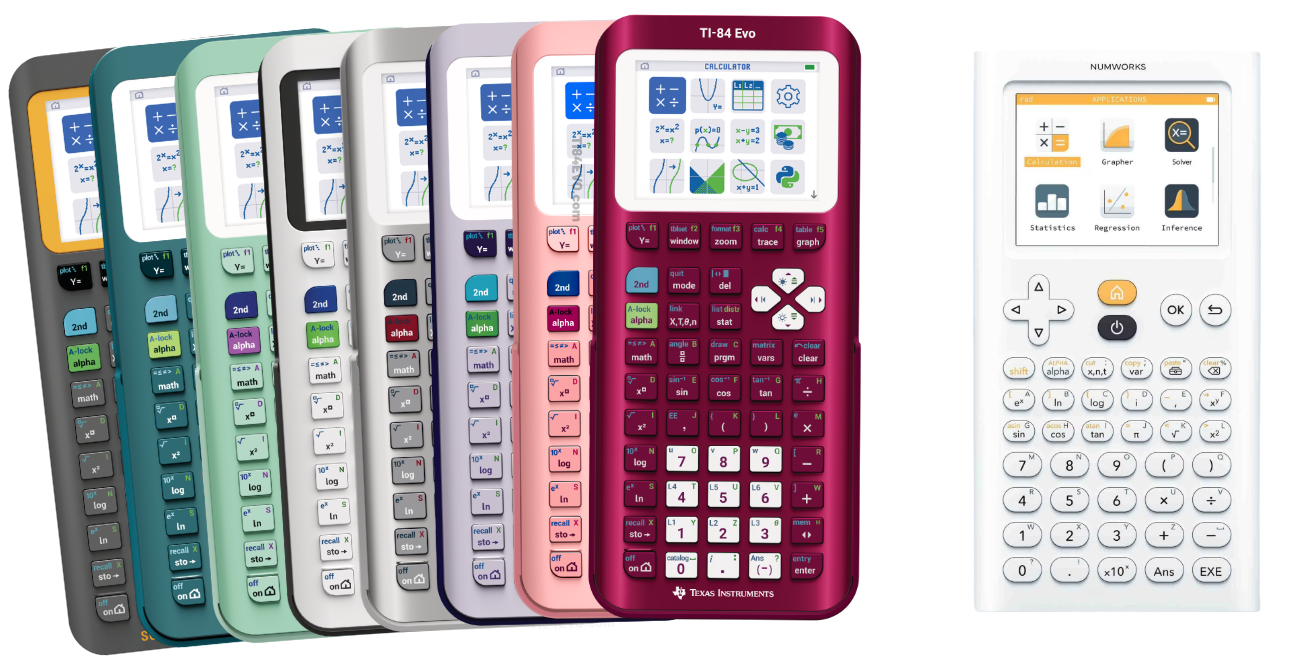
The TI-84 Evo is Texas Instruments’ new flagship graphing calculator, introduced for the 2026 school year as the modern successor to the legendary TI-84 Plus CE. It keeps the TI-84 familiarity that millions of classrooms already teach to, but adds meaningful upgrades: a faster ARM Cortex processor running at 156 MHz (roughly three times the speed of previous TI-84 models), a redesigned icon-based home screen, a refreshed keypad, USB-C charging, and roughly 50% more on-screen graphing space than the TI-84 Plus CE (this is a giant improvement!). You can write programs in both the classic TI-BASIC language and in Python, and it ships in seven colors: White, Mint, Pink, Lavender, Teal, Metallic Raspberry, and Metallic Silver.
Pricing for individual buyers is around $130-$160. Each retail unit includes a matching slide cover, a USB-C cable, and a free four-year Ti-84 Evo online calculator license (an $80 value!).
NumWorks Graphing Calculator

NumWorks is a French-designed graphing calculator that shook up the category by being the first graphing calculator programmable in Python. It built its reputation on a clean, app-based interface that looks and feels more like a smartphone than a traditional calculator, and a free online and mobile simulator you can practice with before you even own the hardware. The current model (N0120) uses a fast STM32H7 Cortex-M7 processor, a 2.8-inch color screen, USB-C charging, and a rechargeable battery rated for 20+ hours per charge.
The NumWorks calculator typically sells for around $125, making it one of the more affordable full-featured graphing calculators approved for standardized tests. Deliberately, like the Ti-84 Evo, it has no Bluetooth, Wi-Fi, or internet access, keeping it distraction-free and exam-friendly.
Side-by-Side Specs Comparison
Here’s how the two calculators stack up across the specifications that matter most. (Prices are typical retail and can change with sales and bundles.)
| TI-84 Evo | NumWorks | |
| Release Year | 2026 | 2017 |
| Processor | ARM Cortex, 156 MHz | STM32H7 Cortex-M7, up to 550 MHz |
| Display | 2.8-inch diagonal, backlit color, 320×240 | 2.8-inch diagonal, backlit color, 320×240 |
| Programming | Python + TI-BASIC | Python |
| Charging | USB-C (or via TI Charging Station) | USB-C |
| Connectivity | USB-C / TI Charging Station (no Wi-Fi/Bluetooth) | USB-C (no Wi-Fi/Bluetooth) |
| CAS (symbolic algebra) | No (non-CAS, exam-legal) | No (non-CAS, exam-legal) |
| Free Online Calculator? | Free Four-Year Online Calculator License Included | Yes. |
| Color options | White, Mint, Pink, Lavender, Teal, Raspberry, Silver | White |
| Calculator Dimensions (with cover) | 7.57″ x 3.4″ x 0.8″ | 6.3″ × 3.36″ × 0.55″ |
| Weight (with cover) | 207 grams | 169 grams |
| Exam approval | SAT, PSAT/NMSQT, ACT, AP, IB | SAT, ACT, AP, IB |
What the TI-84 Evo and NumWorks Have in Common
It’s easy to focus on the differences, but these two calculators overlap more than you might expect. The similarities are the reason either one is a safe purchase:
- Test approval: Both are approved for the SAT, ACT, AP exams, and the IB Diploma Programme, so neither will get you turned away on exam day.
- Python on board: Both are capable of programming in Python, the language students are most likely to use in college and careers.
- USB-C charging: Both ditch disposable batteries for a rechargeable battery and a modern USB-C port.
- Color graphing displays: Both use a 2.8-inch, 320×240 color screen for clear, readable graphs.
- Non-CAS: Neither includes a full Computer Algebra System, which is exactly why both are allowed on the strictest standardized tests.
- Core math power: Both graph functions, solve equations and systems, run statistics and probability distributions, and handle the full range of high-school and early-college math.
- Distraction-free: Neither has internet, Wi-Fi, or Bluetooth, so they keep students focused on math.
Key Differences That Will Decide Your Choice
1. Price and Value
The NumWorks graphing calculator tends to be slightly cheaper than the Ti-84 Evo. The price of the NumWorks graphing calculator is usually about $125.00, while the Ti-84 Evo is about $130 to $160, depending on which color you’re buying. For families buying a single calculator, that gap may not be decisive, but for schools and districts buying class sets, it adds up quickly. If you’re a school looking to buy lots of either calculator, we recommend looking around for quotes from authorized dealers to get discounts for your school.
2. Ease of Use and Interface
This is where NumWorks shines. Its app-based menu is so intuitive that most students can find what they need within minutes — each function is clearly labeled with examples, instead of relying on sometimes-confusing key combinations TI is known for. The TI-84 Evo narrows this gap with its new icon-based home screen, but the broader TI-84 experience still carries some legacy menus. If you value a gentle learning curve, NumWorks feels more modern; if you (or your teacher) already know the TI-84 layout, the Evo will feel instantly familiar. In short, the NumWorks calculator will be easy to use in the beginning, but the Ti-84 Evo may shine in the long term for you.
3. Ecosystem and Classroom Support
This is where Texas Instruments dominates. The TI-84 platform has thousands of downloadable programs, an enormous catalog of teacher-created lessons, answer keys, and activities, and near-universal support in U.S. math curricula. Many teachers project a TI-84 emulator and teach keystroke-by-keystroke. If your class is taught on a TI-84, the Evo removes friction.
4. Programming
Both run Python, but they appeal to different makers. Texas Instruments has a much more expansive offering of third party accessories that can be controlled via python, and work well with both STEM and science courses.
5. Speed, Display, and Hardware
The TI-84 Evo’s headline upgrade is speed — about three times faster than older TI-84s — plus roughly 50% more graphing area than the TI-84 Plus CE, a redesigned keypad, and seven color options. NumWorks counters with an extremely fast Cortex-M7 chip, a very light body (~167 g), strong 20+ hour battery life, and a minimalist design. In day-to-day classroom math, both feel snappy; the Evo’s large usable graph area is a nice perk for graphing-heavy courses.
6. Color and Personalization

Small but real: the TI-84 Evo comes in seven colors (White, Mint, Pink, Lavender, Teal, Raspberry, Silver), while NumWorks sticks to a single clean look. If personalization matters to a younger student, that’s a point for TI.
Before You Buy: What Every Shopper Should Check
A graphing calculator is a multi-year purchase, often used from middle school through college. Before you click “buy,” run through this checklist:
- Ask your teacher or course syllabus first. Some classes require a specific model or brand, especially for in-class instruction and exams. This single question can override every other factor below.
- Confirm exam approval for your specific test. Both calculators are approved for the SAT, ACT, AP, and IB, but always verify against the current calculator policy for the exact exam you’re taking, since policies are updated periodically.
- Check whether your school standardizes on TI. If teachers demonstrate everything on a TI-84, matching that hardware saves real frustration.
- Think about how long you’ll use it. If you’re heading into STEM coursework, the Evo is most likely going to be the better bet.
- Factor in total cost. Look for back-to-school bundles, classroom discounts, and the value of included extras like cases, cables, and software licenses.
- Consider buying new, not used. Exam boards sometimes restrict tampered or modified units, and a rechargeable battery degrades over time. A new unit avoids surprises.
Our Recommendation: Which Should You Choose?
Choose the NumWorks if…
- You want the best value — it’s roughly $5 to $35 cheaper.
- You prefer a clean, modern, app-style interface that’s easy to learn.
- Your school doesn’t require a specific brand.
- You want a light, distraction-free device with great battery life.
Choose the TI-84 Evo if…
- Your school or teacher standardizes on Texas Instruments.
- You want the largest ecosystem of programs, lessons, and support.
- You value brand familiarity and decades of classroom continuity.
- You want a faster TI-84 with more graphing space and USB-C.
- Color choices and the included 4-year online calculator license appeal to you.
The Bottom Line
There’s no wrong answer here — both are modern, exam-approved, Python-capable calculators that will last for years. Pick the NumWorks if you want the most value and the friendliest learning curve, and pick the TI-84 Evo if you want the strongest ecosystem and seamless alignment with how most U.S. classrooms teach. When in doubt, follow your school’s lead: matching the calculator your teacher uses is the surest way to avoid headaches in class and on exam day.
Frequently Asked Questions
Yes. Both run Python. NumWorks was the first graphing calculator programmable in Python, and the TI-84 Evo runs Python as well as letting you program in the TI-BASIC language.
No. Neither the TI-84 Evo nor the NumWorks includes a full Computer Algebra System.
Most beginners find the NumWorks easier thanks to its labeled, app-based menus. The TI-84 Evo’s new icon home screen helps, but the TI experience still rewards students who learn its traditional key sequences.