
Estimated reading time: 14 minutes
Introduction: Two Calculators, One Famous Family
If you have spent any time shopping for a scientific calculator, you have almost certainly run into Texas
Instruments. For decades, the company’s affordable, durable, exam-approved calculators have been a
fixture in classrooms, on lab benches, and in test-center cubbies around the world. Two models in
particular dominate the conversation for middle school, high school, and early college students: the
TI-30XIIS and the TI-30XS MultiView. They look similar, they cost roughly the same, and they share a
great deal of fundamentals — yet they are meaningfully different tools built for slightly different users.
This guide is designed to settle the question once and for all. We will walk through every important
specification, feature, and quirk of both calculators, line them up side by side, and call out where they
overlap and where they diverge. By the end, you will know exactly which model fits your coursework,
your budget, and your testing requirements. Whether you are a parent buying for a seventh grader, a
high schooler heading into chemistry, or an adult brushing up for a placement exam, this is the
comparison you need.
Quick Verdict: Which Should You Buy?
Buy the TI-30XS MultiView if you want the more capable calculator. Its four-line display,
textbook-style “MathPrint” formatting, exact-answer toggle, data/list editor, and built-in equation
solvers make it the better long-term value for most students moving through algebra, geometry,
statistics, chemistry, and beyond. It is the model most teachers recommend today.
Buy the TI-30XIIS if you specifically prefer (or your instructor requires) the classic two-line entry style,
you want the simplest possible interface, or you find it at a noticeably lower price. It remains a fully
capable, exam-approved scientific calculator that has served students well for years.
Both are approved for the SAT, ACT, and AP exams, both are solar-plus-battery powered, and both
come from the same trusted product line. You will not go “wrong” with either — but for the majority of
buyers in 2026, the MultiView is the smarter pick. The rest of this guide explains why in detail.
Side-by-Side Specification Comparison
Here is the at-a-glance breakdown. We unpack each of these rows in the sections that follow.
| Feature | TI-30XIIS | TI-30XS MultiView |
| Display | Two lines (entry + result) | Four lines, 16 characters wide |
| Display style | Standard linear entry | MathPrint™ (textbook formatting) |
| Fractions | Entered/shown linearly; decimal conversion | Stacked fractions with a true fraction bar |
| Exact answers | Decimal approximations | Toggle between exact (√, π, fraction) and decimal |
| Statistics | 1- and 2-variable | 1- and 2-variable, with data/list editor |
| Data/list editor | No | Yes — up to 3 lists, 42 entries each |
| Equation solvers | No | Numeric, polynomial & linear-system solvers |
| Function (x,y) table | No | Yes |
| Memory variables | Multiple (linear entry) | 7 variables (x, y, z, t, a, b, c) |
| Previous-entry scroll | Limited | Scroll, edit & re-paste prior entries |
| Power | Solar + battery | Solar + battery |
| Hard case | Slide cover | Snap-on protective cover |
| Exam approval | SAT, ACT, AP | SAT, ACT, AP |
| Best for | Pre-algebra → Algebra II, general science | Algebra → Statistics, Chemistry, Biology |
| Typical price | ~$12–$18 | ~$15–$24 |
| Available Colors | Black (Classic), White, Red, Lavender, Pink, Blue, Lime Green, Orange, Raspberry | Classic, Pink |
The TI-30XIIS in Depth

The TI-30XIIS is a member of the long-running TI-30 family — a lineage of inexpensive scientific calculators that stretches back to the 1970s. The “IIS” designation marks it as a two-line, solar-and-battery (“S”) model. It was, for many years, the default recommendation for students who needed more than a four-function calculator but did not need a programmable graphing machine.
Display and interface
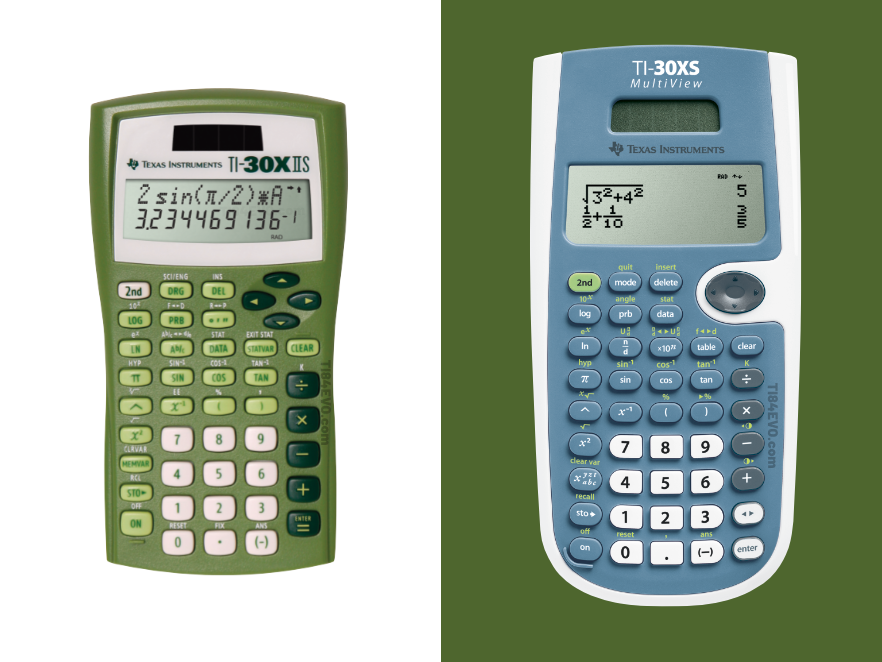
The defining feature of the is its two-line display. The top line shows what you are entering, and the bottom line shows the result. This is a meaningful upgrade over single-line calculators because you can see your entire expression, catch typos before you hit equals, and edit what you typed. The entry line displays up to 11 characters at a time and scrolls left and right to accommodate longer expressions (up to 88 characters), while the result line shows a 10-digit answer with a 2-digit exponent.
Core functions
Despite its modest footprint, the TI-30XIIS is genuinely capable. Its function set includes:
- One- and two-variable statistics for working with data sets, means, standard deviations, and regressions.
- Common and natural logarithms (log and ln) and their inverses.
- Fraction entry in traditional numerator/denominator format, plus fraction-to-decimal conversion.
- Trigonometric and hyperbolic functions, with degree, radian, and gradian angle modes.
- Reciprocals, factorials, powers and roots, and polar/rectangular conversions.
- Recognition of π as a symbol when working in radian mode, plus degree-to-decimal conversions.
It also offers menu-driven settings, letting you choose the configuration appropriate for the calculation at hand rather than memorizing obscure key combinations.
Build, power, and the exam factor
The TI-30XIIS runs on both solar and battery power, so it sips energy and rarely (if ever) dies at an inconvenient moment. It measures roughly 6.1 inches tall, 3.2 inches wide, and 0.8 inches ‘thick,’ and ships in a range of colors such as Black, White, Blue, Pink, Raspberry, Lavender, Lime Green, Orange, and Red. A protective cover guards the keypad and screen in a backpack. Crucially, it is approved for the SAT, ACT, and AP exams, which is the single most important box for many buyers.
Who the TI-30XIIS is for?
The TI-30XIIS is an excellent match for students in pre-algebra through Algebra II, geometry, introductory statistics, and general science courses. If you appreciate a no-nonsense interface, learned on a two-line calculator and want to stick with what you know, or simply want the most economical TI scientific calculator that still covers exams, it remains a smart, reliable choice.
The TI-30XS MultiView in Depth

The TI-30XS MultiView is the newer, more ambitious sibling. Introduced to modernize the scientific-calculator experience, it takes the trusted TI-30 foundation and layers on a larger display and a suite of features aimed at deeper exploration of mathematics. The “MultiView” name is the whole story: this calculator wants you to see more at once.
The four-line MathPrint display
Where the TI-30XIIS shows two lines, the MultiView shows four lines of 16 characters each. That extra real estate is insanely helpful when crunching numbers. You can enter more than one calculation, stack them on screen, compare results, and spot patterns — all without losing your previous work. Even better is MathPrint™ mode, which renders expressions, symbols, and fractions the way they appear in a textbook. A fraction looks like a real stacked fraction with a horizontal bar; exponents sit up high; square roots wrap their contents. For students still building fluency with mathematical notation, seeing the math the “right” way reduces transcription errors and reinforces good habits.
If you prefer the older behavior, a Classic mode makes entry and display compatible with previous two-line scientific calculators.
Exact answers and the toggle key
One of the MultiView’s most loved features is the answer toggle key. Press it and the displayed result flips between forms: fraction and decimal, exact square root and its decimal value, or exact multiples of π and the decimal equivalent. Instead of a calculator that always collapses everything to a rounded decimal, you get one that can hold and display exact values — for example, returning 1/3 instead of 0.3333333, or √2 instead of 1.414213562. That capability alone makes the MultiView feel like a more mathematically honest tool, and it is a major reason teachers favor it.
Data editor, solvers, and tables
The MultiView adds genuine analytical muscle that the TI-30XIIS lacks:
- Data/list editor: Enter values into as many as three lists, each holding up to 42 entries, then run one- and two-variable statistics or build formulas across columns — a workflow much closer to a spreadsheet or graphing calculator.
- Equation solvers: Built-in tools solve numeric equations, polynomials, and systems of linear equations, saving time on algebra-heavy problem sets.
- Function (x, y) table: Explore a table of values for a given function automatically or by entering specific x-values — excellent for understanding behavior and graphing by hand.
- Seven memory variables: Store real numbers or expressions in x, y, z, t, a, b, and c, and reuse them across calculations.
- Entry history: Scroll back through previous entries, edit them, and re-paste them onto the entry line. The last result is saved in the Ans variable and is retained even after the calculator is switched off.
Build, power, and the exam factor
Like its sibling, the MultiView is battery powered with solar assistance to extend battery life, and it ships with a snap-on protective cover. And — just as importantly — it carries the same SAT, ACT, and AP approval. You are not trading away exam eligibility to get the extra features.
Who the TI-30XS MultiView is for
The MultiView shines for students moving into more demanding territory: Algebra I and II, geometry, statistics, and — notably — chemistry and biology, subjects for which Texas Instruments specifically recommends the MultiView over the TI-30XIIS. If you want one calculator to carry you across several years and several subjects, the MultiView is built for exactly that.
What the Two Calculators Have in Common
For all the talk of differences, these two calculators are close cousins, and their similarities are part of why the choice feels difficult. Here is the common ground:
- Exam approval: Both are approved for the SAT, ACT, and AP exams — the non-negotiable requirement for most test-takers.
- Dual power: Both use solar cells backed by a battery, so they last for years and rarely (if ever) die mid-exam.
- Core scientific functions: Both handle trigonometry, hyperbolics, logarithms and antilogs, powers and roots, reciprocals, factorials, π, percentages, and angle conversions among degrees, radians, and gradians.
- One- and two-variable statistics: Both compute means, standard deviations, and regressions on data sets.
- Two-line minimum: Both improve on single-line calculators by showing your entry and your result together, so you can review and edit expressions.
- Course coverage: Both are recommended for general math, pre-algebra, Algebra I and II, geometry, statistics, and general science.
- Durability and price class: Both are rugged, backpack-friendly, similarly priced, and backed by Texas Instruments’ reputation and support.
In other words, the floor is the same. The MultiView simply raises the ceiling.
The Key Differences That Actually Matter
If you remember nothing else, remember these five distinctions:
- Display size and formatting. Two lines of linear text (XIIS) versus four lines of textbook-style MathPrint (MultiView). This is the most visible, day-to-day difference.
- Fractions. On the TI-30XIIS, the fraction feature is essentially a decimal conversion tool. On the MultiView, fractions are first-class: you enter and see them as true stacked fractions and can do full fraction arithmetic with a proper fraction bar.
- Exact vs. decimal answers. Only the MultiView toggles between exact values (fractions, √, π) and decimal approximations. The XIIS gives you decimals.
- Analytical tools. The MultiView’s data/list editor, equation solvers, and function table have no equivalent on the TI-30XIIS.
- Subject reach. Texas Instruments recommends the MultiView (but not the XIIS) for chemistry and biology, reflecting its greater capability.
Pricing and Value: Is the MultiView Worth a Few Dollars More?
In most stores the two calculators are separated by only a few dollars. As of mid-2026, the TI-30XIIS typically lands around $12–$18, and the TI-30XS MultiView around $15–$24, with prices bouncing during back-to-school season and varying by color and retailer. Because the gap is so small, the value question is rarely “can I save money with the XIIS?” and more often “is the simpler interface actually what I want?”
For the overwhelming majority of buyers, the MultiView’s extra capabilities, which include exact answers, real fractions, solvers, and a data editor, are worth far more than the modest price difference, especially since the calculator will likely be used across multiple courses and several years. The XIIS becomes the better value mainly when it is on sale well below the MultiView, or when an instructor explicitly standardizes on it.
Buyer Scenarios: Match the Calculator to the Student
The middle schooler starting pre-algebra
Either calculator works, but the MultiView’s textbook-style display helps a younger student internalize correct notation from the start. If budget is tight and the school supply list says “two-line scientific calculator,” the XIIS is perfectly sufficient.
The high schooler heading into chemistry or statistics
Go with the MultiView. The data/list editor streamlines statistics, the exact-value toggle is invaluable in chemistry and physics, and the larger display reduces mistakes on multi-step problems. This is the strongest case for the MultiView.
The standardized-test taker (SAT / ACT)
Both are approved, so choose based on comfort. Many test-takers prefer the MultiView for its quicker fraction handling and the ability to verify answers in exact form. If you have practiced exclusively on a two-line calculator, however, do not switch right before test day — familiarity beats features under time pressure.
The adult returning to school or prepping for a placement exam
The MultiView’s clearer display and forgiving entry editing make re-learning math less frustrating. Unless you already own and love a TI-30XIIS, the MultiView is the friendlier reintroduction.
The budget-first buyer
If the lowest possible price is the priority and you find the XIIS discounted, buy it without worry. It is a proven, exam-ready calculator. Just confirm the savings are real — at full price, the tiny gap rarely justifies giving up the MultiView’s features.
Pros 😊 and Cons 🙁 at a Glance
TI-30XIIS
| Pros 😊 | Cons 🙁 |
| Simple, familiar two-line interface | No exact-answer toggle |
| Often the lowest-priced TI scientific option | Fractions are conversion-only, not true fractions |
| Lightweight and proven reliable | No data/list editor or equation solvers |
| Exam-approved (SAT, ACT, AP) | Not recommended for chemistry/biology |
TI-30XS MultiView
| Pros 😊 | Cons 🙁 |
| Four-line MathPrint textbook display | Slightly higher price (usually only a few dollars) |
| Exact ↔ decimal answer toggle | More features can mean a steeper learning curve |
| True stacked fractions and full fraction math | Larger menu system than the minimalist XIIS |
| Data editor, solvers, and function tables | Overkill for someone who only needs basics |
| Recommended for chemistry and biology too | Not available as in as many colors |
Final Word: Choosing With Confidence
The TI-30XIIS and the TI-30XS MultiView are both excellent, exam-approved scientific calculators from a brand that has earned its place in classrooms for half a century. They share the same rugged build, the same dual power, the same exam eligibility, and the same broad library of scientific functions. The honest truth is that you cannot make a bad choice between them.
But if you want a recommendation rather than a shrug: choose the TI-30XS MultiView. Its four-line MathPrint display, exact-answer toggle, true fractions, data editor, and solvers make it the more capable and more future-proof tool, and the price premium over the TI-30XIIS is small enough to ignore. Reserve the TI-30XIIS for the buyer who prizes simplicity, is replacing a calculator they already love, or finds it at a price too good to pass up.
Whichever you choose, you will be holding a calculator trusted by millions of students — and now you will know exactly what it can do.
Frequently Asked Questions
Yes. The TI-30XS MultiView is approved for the SAT, ACT, and AP exams. So is the TI-30XIIS. Always
double-check the current policy for your specific test, as approved-calculator lists are updated
periodically, but both of these models have long been on the approved lists.
The biggest difference is the display. The TI-30XIIS has a two-line display with standard linear entry,
while the TI-30XS MultiView has a four-line MathPrint display that shows fractions and expressions like a textbook and can toggle answers between exact and decimal forms. The MultiView also adds a data/list editor, equation solvers, and function tables.
Yes. On the TI-30XIIS, the fraction tool is mainly for converting between fractions and decimals. The
MultiView lets you enter, display, and calculate with true stacked fractions using a real fraction bar, and
you can toggle between fraction and decimal results instantly.
For most students, yes — the MultiView’s exact answers, true fractions, and analytical tools add real
value for only a few dollars more. The main reason to stay with the XIIS is if you strongly prefer its
simpler two-line interface or your instructor requires it.
The TI-30XS MultiView. Texas Instruments specifically recommends the MultiView (and not the
TI-30XIIS) for chemistry and biology, thanks to its exact-value handling and larger display.
For general high-school math and science, the TI-30XS MultiView is the better all-around choice and will carry a student through more subjects and years. The TI-30XIIS is a solid, lower-cost alternative if you want simplicity or find it on sale.
No. Both are scientific calculators, not graphing calculators. The MultiView can display a table of (x, y) values for a function, but neither model draws graphs. If you need graphing, look at the TI-84 Plus family instead.
Both are solar powered with a backup battery. The solar cells extend battery life significantly, so the battery lasts a long time and the calculators rarely lose power unexpectedly.